How it works
Where does the next song start, and what is it?
Cue answers both on your phone. The song starts make Next work; the IDs tell you what you're hearing.
Song starts
- Read what's thereChapters in the file, or a tracklist with times that you paste (05:32 Song title). If the DJ published times, Cue uses them as they are.
- Name the songsAt points through the mix, Cue makes a short audio signature and asks Apple's ShazamKit what's playing. The audio stays on the phone.
- Find the cutA small song-cut model, running on the phone, listens for the moment one song hands over to the next.
- Fill the gapsSongs nobody can name still get a start, marked “ID?”, so Next still works.
Shows on the Featured shelf arrive with their song starts already marked, from the publisher's own tracklist when there is one.
Track ID
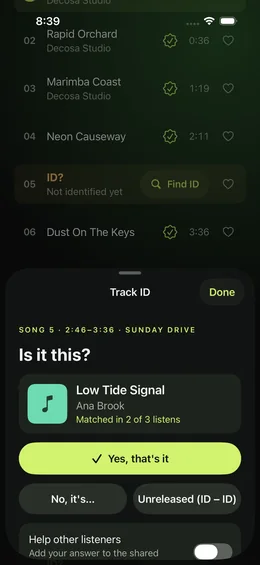
Every row in the Songs sheet (the Songs button on Now playing) carries one of three states, and the top of the sheet counts them: identified, ID? and ID – ID.
- Identified: a fingerprint match, a line in the DJ's tracklist, or the file's chapters. Tap the seal to see which.
- ID? Tap Find ID. Cue listens to that stretch of your file a few times with ShazamKit (no microphone, no permission prompt) and asks “Is it this?” Answer Yes, No, it's… or Unreleased.
- ID – ID: unreleased, marked as such so nobody keeps searching for it.
- Share the ID card: an image with the song, the set and the moment. Its link goes to the song's store search, never to a file.
Watch it on an ID? or an ID – ID, and Cue tells you when it's found. Once a day Decosa re-reads the set's public page and this week's Featured tracklists; when one names the song, Cue fills it in and sends a notification. It works for sets that have a public page, and the alert can arrive some hours after the page changed. Free watches 3 IDs at a time; Cue Plus watches every one.
Coming later, with shared cue sheets you opt into: IDs confirmed by other listeners. That switch is off until you turn it on.
Liked songs: the DJ's version, on demand
A liked song in Cue isn't a link to the original track. It's that song in that set: the stretch of the mix from the song's start to the next song's start, with the DJ's edit and blend.
- Heart it on Now playing, in the mini player, in the Songs sheet or on the Watch.
- Tap it in Liked songs and Cue opens its mix at that song and stops at the end of it, or moves on to the next liked song.
- Play liked songs runs the whole list, across mixes. Next goes to the next liked song; ◀◀ goes back to the start of this one, and a second press to the one before.
- If Cue later re-marks the mix, the like follows its song. It needs the mix to stay in your library.
- Find opens the song on Apple Music, Spotify, Bandcamp, Beatport or YouTube, and you can mark it found.
Visuals: the music, drawn
Cue carries 13 live visuals from Everdust, among them Latent Space, Three-Body Ink, Attention IV, Blox Mandala, Strange Attractors, Dot Tunnel, Particle Vortex, Inside the Latent Space, Cathedral, Circle Portal, Cable Vortex, Ferrofluid. They're all free.
- They listen to the mix, on the phone. Cue reads the audio as it plays (bass, kicks, mids, voices) and the visual moves with it. Nothing is recorded or sent, and the microphone is never used.
- It stays put. A visual keeps going through song starts until you change it; Pin holds it even through a swipe. Change with each song (off unless you switch it on) cross-fades to the next visual at every song start.
- Move it and tune it. In full screen, drag to turn the camera, pinch to zoom and double-tap to go back; the ‹ › row under the visual, or a swipe from the side edge, changes visual. Tune sets speed, glow, brightness, point size and colour for each visual, and remembers them. Whatever you tune, the flash guard still has the last word.
- Where they show: behind the scrubber on Now playing, full screen, and live at the top of the Visuals tab. Only one renders at a time; the gallery tiles are short clips.
- A flash guard checks every frame before it's shown and holds back any part of the picture that flashes too often, with a tighter limit for saturated red. Reduce flashing (in Settings, the Visuals tab and the picker) turns flashes into slow swells. Under Reduce Motion, visuals open as stills until you tap Play motion.
- When they rest: with nothing playing they show a still, and in the car they don't show at all.
How close it gets
We checked Cue's engine on 8 public mixes against the start times the DJs published themselves: 190 song starts across dancehall, jungle, hardstyle, peak-time house, techno, progressive and long melodic-house live sets. A start counts when Cue's mark is within the stated number of seconds of the DJ's.
| Method | Within 10 s | Within 20 s | Within 30 s |
|---|---|---|---|
| Song names from audio fingerprints alonethe engine without its song-cut model | 62 | 84 | 131 |
| Fingerprints plus the song-cut modelCue's open-source engine | 99 | 123 | 144 |
Cut-style mixes (dancehall, jungle, hardstyle) land about where two people marking the same mix disagree. Long house blends are harder: the DJ's timestamp marks the mix-in, and two tracks can play together for a minute.
What these numbers are, and aren't
- They are development numbers. The same mixes were used while the engine was built, so a fresh set of mixes may score lower.
- In the engine test, song names came from a fingerprint service used during development. The app uses Apple's ShazamKit instead, and runs a rebuilt song-cut model on the phone.
- The app hasn't been scored end to end on these mixes yet. When it has, its number goes here.
When it's wrong
- Long-press a song in the Songs sheet to nudge its start.
- Paste the DJ's tracklist with times (••• › Paste a tracklist), and Cue uses those names and starts.
- Mark a start yourself while listening: ••• › Mark song start here.
What it never does
- It doesn't upload your mixes. Song finding runs on your iPhone.
- It doesn't download or rip streams. You bring the file, or pick a show the artist gives away.